Choose a route
Start with a factory area, product category or guided story. A visitor can jump to the part relevant to their role.
 By Digital Apple
Explore a factory, practise a procedure or demonstrate how equipment and AI support a production line.
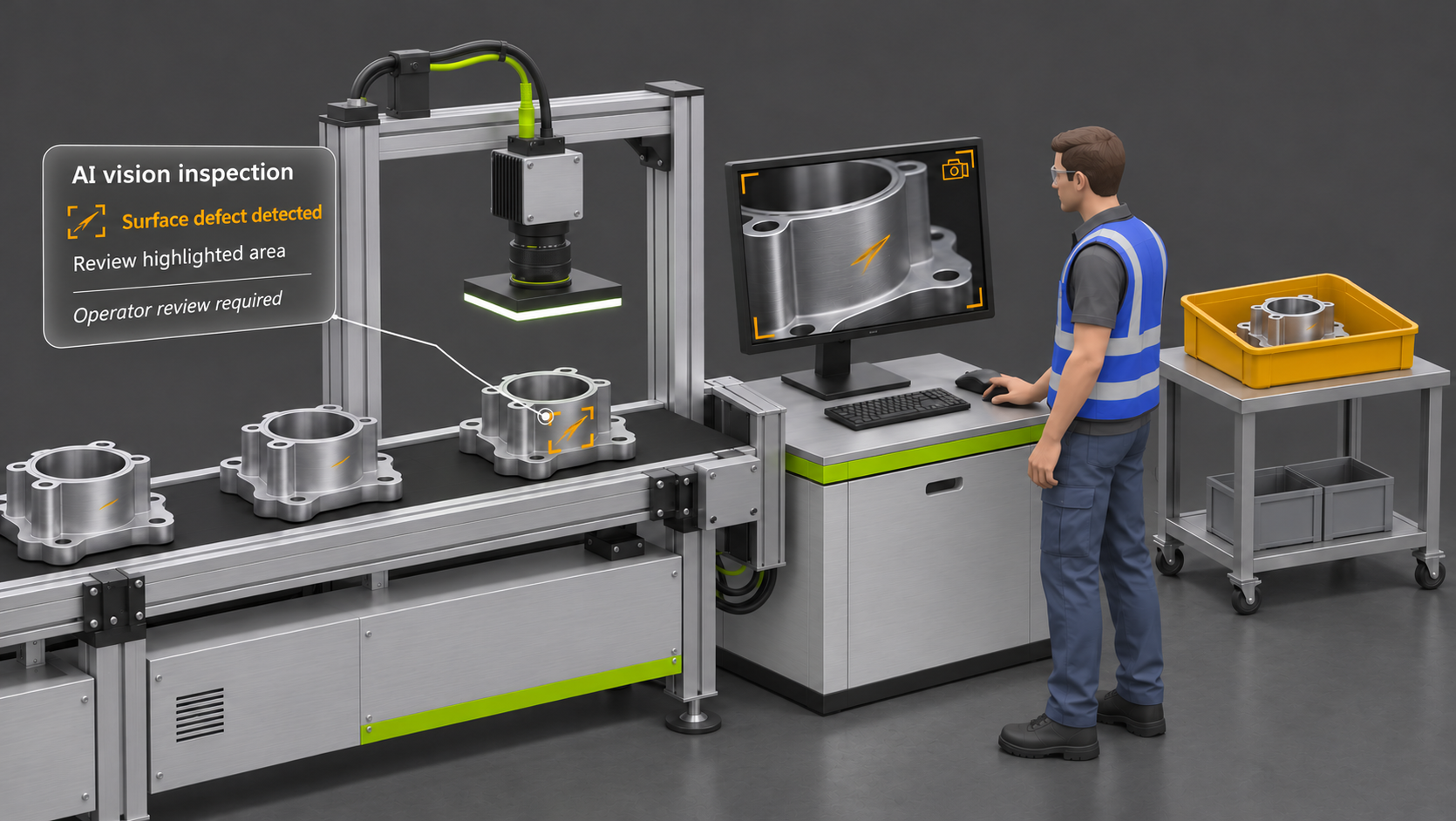
Follow a camera inspection from a flagged surface defect to the operator’s review.
Take visitors along the vehicle assembly line. Select a workstation to explain what happens there.
Let an operator practise checking a robotic workstation using the control panel and the on-screen component guide.
Review the assembly layout from above to see how vehicles, robots and workstations are arranged.
Show how your equipment, software and AI solutions work in a manufacturing setting.
Explore solutionLet buyers explore your machinery and product range, with technical detail close at hand.
Explore solutionGive teams a place to practise equipment operation, maintenance and safety tasks.
Explore solutionExplore facilities and assets in 3D, with data connections where the project needs them.
Explore solutionBring your products, capabilities and innovation stories together in one destination.
Explore solutionLet buyers view a supported 3D product in their own space through a compatible mobile browser.
Explore solutionUse a headset for demonstrations, spatial reviews or task practice at a realistic scale.
Explore solutionConnect factory locations, facilities and service areas to relevant 3D environments.
Explore solutionGuide people from an overview to the products, demonstrations and information they need.
Start with a factory area, product category or guided story. A visitor can jump to the part relevant to their role.
View a machine or component from useful angles, open a supported close-up and explore approved variants or configurations.
Follow an animation or interactive sequence showing what happens at each station and how the parts work together.
Read specifications, diagrams, brochures or videos beside the relevant equipment instead of searching through separate files.
An optional AI guide can answer from approved material and suggest the next product or resource. Its scope and content controls are agreed separately.
A visitor can shortlist products or send an enquiry with the products and questions they selected, when those features are included.
From the initial idea to launch, we work with your team to make the experience clear, accurate and useful.
Identify the audience, the products or solutions to show, and what people should understand or do.
Review your product information, CAD files, images and references. Agree what to reuse and what to create.
Map the setting, navigation and interactions. Prototype a representative journey for your team to review.
Develop the 3D models, content and interactions. Review technical accuracy with your specialists and refine the experience.
Test on the agreed devices, resolve feedback and prepare for launch. Arrange handover, hosting and ongoing support.
Manufacturers can offer virtual factory tours, explain production workflows and train employees. Industrial suppliers can demonstrate machinery, automation, software and AI solutions in a customer’s manufacturing environment. Visitors can explore equipment, see how a solution works and open technical information.
No. Share what you have: an idea, product information, photos, drawings or videos. We can help visualise the concept and create the 3D models and content for your experience.
We can do either. A replica of your factory suits projects where the actual layout matters. A prebuilt environment can provide a representative setting for your products and solutions. We help you choose the approach that fits your purpose.
No. Tours, showrooms and demonstrations can run in a web browser. VR is an option for experiencing scale, exploring a space or practising tasks with a headset. We agree device support around your audience and how they will use the experience.
Your product and engineering specialists review the models, animations and technical content during development. Their input helps us show how the equipment works and ensure the final experience reflects your approved information.
Yes. Equipment models and environments can often be reused, with different activities for each audience. Buyers can explore demonstrations and technical information; employees can practise procedures, make decisions and receive feedback.
Yes, where suitable systems and access are available. We work with your team to identify the data people need and how to connect it securely. Live data is optional; tours and product demonstrations can work without it.
Yes. We can show how your AI solution works or how your factory uses it. A quality-inspection example could follow a camera image through detection, operator review and action. Your team validates the behaviour and evidence. Illustrative demonstrations are labelled; a working AI connection requires additional development.
Cost and timing depend on the models, content, interactions and integrations required. A product demonstration needs different work from a factory replica or training programme. After discussing your brief, we provide a proposal with deliverables, pricing and a schedule.
Sales measures can include product views, demonstration engagement, document opens and enquiries. Training measures can include completion and assessment results. We agree the measures and reporting around what you want the experience to achieve.